5. Setting Up Your Own Vessel
This section turns a fresh installation into your ship’s system, in the order you’d actually do the work: set up your institution’s repository, write a cruise definition, build and test loggers for your instruments, and teach the system to parse what they say. It ends with a worked example that does all of it for one new sensor.
Two habits make everything in this section easier. First, keep the NBP
sample cruise (section
4) open beside you — it
is a working model of every pattern described here. Second, gather a
file of timestamped sample data for each of your instruments as you go:
with simulate_data replaying it, you can build and debug every
configuration at your desk, with no instrument attached and no watch
disturbed.
Throughout, we’ll use a fictional institution, the University of Upper
Windsock (uuw), and its vessel the M/V Plunger (mvp).
Your Institution’s Repository and local/
Every ship running OpenRVDAS accumulates files of its own: cruise
definitions, device definitions for its instruments, calibration
files, perhaps a transform or two written for an unusual sensor.
Those files belong in a repository of your own, checked out
alongside OpenRVDAS and symlinked into OpenRVDAS’s local/ directory.
Assuming you’ve installed OpenRVDAS into /opt/openrvdas, the conventional setup for your institutional repository would be alongside it, e.g., in /opt/openrvdas_uuw:
cd /opt
git clone https://github.com/uuw/openrvdas_uuw.git
ln -s /opt/openrvdas_uuw /opt/openrvdas/local/uuw
Everything in your repository can now be referred to from within the
OpenRVDAS directory as local/uuw/..., as though it were part of
OpenRVDAS — while remaining entirely separate from it. Why this
arrangement:
- Your history is your own. Cruise definitions and calibrations are committed, reviewed and tagged in your repository, on your schedule.
- Upgrading OpenRVDAS doesn’t touch your files. The link isn’t part of the OpenRVDAS repository, so a new release leaves it, and everything behind it, alone.
- One repository can serve a fleet: shared device definitions and templates at the top, a directory per vessel below.
- Your configuration can be recorded exactly. A config snapshot records the commit of every repository its files came from — your configuration’s version, separately from OpenRVDAS’s.
Three details that save grief:
- Make sure
local/uuwdoesn’t already exist before runningln -s— if it’s already a directory, the link lands inside it and nothing will find your files. Check withls -l /opt/openrvdas/local/uuw. - The OpenRVDAS user must be able to read the checkout, since the logger manager and loggers run as that user.
- Keep
git statusclean in the OpenRVDAS checkout by excluding the link:echo local/uuw >> /opt/openrvdas/.git/info/exclude.
A layout that works well:
/opt/openrvdas_uuw/                  linked as /opt/openrvdas/local/uuw
  devices/                           device definitions shared across vessels
  logger_templates/                  logger templates of your own
  modules/                           readers, transforms and writers of your own
  mvp/                               the M/V Plunger
    devices/                         devices specific to this vessel
    calibrations-2026-10-01.yaml     calibration coefficients, dated
    calibrations.yaml -> calibrations-2026-10-01.yaml
    MVP2610_cruise.yaml              a cruise definition
  lmg/                               another vessel
Refer to these files in cruise definitions through the link — as
local/uuw/..., never as /opt/openrvdas_uuw/... — so the
definitions stay independent of where the repository is checked out.
And keep secrets (an InfluxDB token, a Sealog JWT) out of the
repository: put them in a git-ignored file and pull it in with an
includes: entry like any other file.
At the end of a cruise, tag the repository
(git tag MVP2610-end && git push --tags) so the configuration can be
checked out later exactly as it ran.
Writing a Cruise Definition
A cruise definition is one YAML file that declares everything the vessel runs. Its top-level keys:
loggers— the loggers that exist, and the configurations each one can run;configs— the definitions of those configurations (unless defined inline or by template, below);modes— which configuration each logger should run in each cruise mode, withdefault_modenaming the mode the system starts in;cruise— metadata: the cruise id (displayed at the top of the console), start and end dates;- and optionally
includes,variablesandlogger_templates, which pull in calibration values and logger templates that let you keep your own configuration files concise and maintainable.
(If YAML itself is new to you, the
YAML primer
covers everything these files use — including the classic trap that
off is a YAML keyword, so the mode name must be quoted: 'off'.)
Written out longhand, the structure looks like this:
loggers:
  gyr1:
    configs: [gyr1-off, gyr1-net, gyr1-net+file]
  knud:
    configs: [knud-off, knud-net, knud-net+file]

configs:
  gyr1-off: {}          # an empty config means "not running"
  gyr1-net:
    readers:
      ...               # full reader/transform/writer definitions,
  gyr1-net+file:        # as described in the next subsection
    ...

modes:
  'off':      [gyr1-off, knud-off]
  port:       [gyr1-net, knud-off]
  underway:   [gyr1-net+file, knud-net+file]

default_mode: 'off'
This longhand form works, and every other form reduces to it — but for a real vessel it is unmanageably verbose: the full-form NBP sample definition runs over 1,500 lines, nearly all of it near-duplicate logger configurations. Three features, used together, bring that down to a couple of hundred:
Variables. Define values once under a top-level variables key
and reference them anywhere as <<variable_name>>:
variables:
  cruise: MVP2610
  raw_udp_port: 6224
  file_root: /var/data/openrvdas
  parse_definition_path: logger/devices/NMEA_0183.yaml,local/uuw/devices/*.yaml
A reference may carry a default, used when the variable isn’t
defined: <<baud_rate|9600>>. (Pick file_root deliberately — the
sample cruise’s /var/tmp/log is self-cleaning scratch space, fine
for the demo and wrong for a ship.)
Logger templates. Most loggers on a vessel are the same logger with different parameters. A template defines the set of configurations once, with variables where loggers differ:
logger_templates:
  serial_logger_template:
    configs:
      'off': {}
      net:
        readers:
        - class: SerialReader
          kwargs:
            baudrate: <<baud_rate>>
            port: <<serial_port>>
        transforms:
        - class: TimestampTransform
        - class: PrefixTransform
          kwargs:
            prefix: <<logger>>
        writers:
        - class: UDPWriter
          kwargs:
            port: <<raw_udp_port>>
      net+file:
        ...
and each logger then becomes three lines:
loggers:
  gyr1:
    logger_template: serial_logger_template
    variables:
      serial_port: /dev/ttyr15
      baud_rate: 4800
When the definition is loaded, each logger’s template expands into
full configurations named gyr1-off, gyr1-net, gyr1-net+file,
exactly as if written longhand. <<logger>> expands to the logger’s
own name.
Includes. Templates and shared fragments live in their own files
— OpenRVDAS ships standard ones under contrib/logger_templates/,
and yours go in your repository — pulled in by an includes list,
wildcards allowed:
includes:
  - contrib/logger_templates/serial_logger_template.yaml
  - contrib/logger_templates/parse_data_logger_template.yaml
  - local/uuw/logger_templates/*.yaml
  - local/uuw/mvp/calibrations.yaml
Before loading any definition, run it through the validator:
validate_config local/uuw/mvp/MVP2610_cruise.yaml
It checks, among other things, that every config a logger declares is
defined, that every mode covers every logger, and that no mode names
an unknown config — the errors that otherwise surface as a cryptic
failure at load time. If it passes, the definition will load, with one
exception: it can’t check a definition whose included files aren’t
present on the machine where it runs. A pre-commit hook in the OpenRVDAS
repository (scripts/validate_yaml_precommit.sh) will run it on
every YAML file you commit, which is worth wiring into your
institution’s repository.
Creating and Testing Loggers
A logger configuration is the readers / transforms / writers
heart of the matter: each key takes a list of components, every
component a class and its kwargs. The configuration is a literal
description of the Python objects to build:
readers:                    # all readers run in parallel
- class: SerialReader
  kwargs:
    port: /dev/ttyr15
    baudrate: 9600
transforms:                 # transforms apply in series, in order
- class: TimestampTransform # no kwargs needed
- class: PrefixTransform
  kwargs:
    prefix: gyr1
writers:                    # all writers run in parallel
- class: LogfileWriter
  kwargs:
    filebase: /var/data/openrvdas/gyr1/raw/MVP2610_gyr1
- class: UDPWriter
  kwargs:
    port: 6224
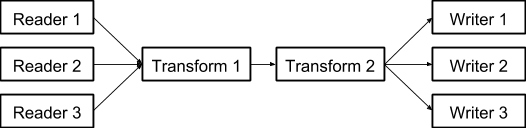
If multiple Readers are defined in a configuration, they run in parallel and their output merges. Transforms run in series; the last transform’s output goes to every Writer in parallel. Arguments with defaults may be omitted. Two refinements worth knowing:
mirror_to:— any reader or transform can optionally carry amirror_tokey naming a writer that receives a copy of every record the component produces. Think of it as a “tap” in the data flow. This is how the standard serial template stores the timestamped raw record before prefixing: a tap on theTimestampTransform, delivered asynchronously so a slow disk never blocks the data flow.stderr_writers:— an optional key, same format aswriters, saying where the logger’s own diagnostic messages should go.
Build it a stage at a time. Command-line flags, as used in the tutorial, are fine for quick exploration — peeking at a port, snooping a UDP stream. But building a logger is best done by growing its YAML file, adding one component at a time and running the file after each addition:
listen gyr1_test.yaml
Start with just the reader. As a convenience, if a configuration
specifies no writer, listen will send the output to stdout, so a
one-component file already shows you the raw records on your screen.
Then add the TimestampTransform and run it again; then the
PrefixTransform; then the real writers, checking the output at each
step. When something breaks, the problem is in the component you just
added. The result of this process is the logger configuration —
there’s no translation step at the end, as there would be from a
command line.
Add -v for info logging, -v -v for debug. (If you do work with
command-line flags, one gotcha will bite you exactly once: flags are
processed in command-line order, so any flag that modifies a
component must come before that component’s flag —
--parse_definition_path before --transform_parse.)
Once the configuration lives in the cruise definition, the same command runs it from there, by naming it after a colon:
listen local/uuw/mvp/MVP2610_cruise.yaml:gyr1-net
This runs a single configuration straight out of the cruise
definition — the exact thing the logger manager will run. Against
simulate_data replaying recorded data, this closes the loop:
definition, logger and parsing all tested before an instrument is
ever touched.
Keep front-line loggers dumb. The pattern the sample cruise
models is worth adopting as policy: the logger attached to the
instrument timestamps the record, stores it raw, forwards it by UDP —
and does nothing else. Parsing and computation happen in second-line
loggers (one parse_data logger handling every instrument’s output
is usually sufficient). The logger closest to the data is the one
whose failure loses data; keep it too simple to fail, and let the
complicated things crash harmlessly downstream.
When no stock component fits, write your own. A reader is any
Python class with a read() method that returns a record; a
transform, anything with transform(record); a writer, anything with
write(record). Put the file in your repository’s modules/
directory and name it in the configuration with a module key —
the Python path follows the directory path, no __init__.py needed:
transforms:
- class: ScaleTransform
  module: local.uuw.modules.scale_transform
  kwargs:
    factor: 3
Readers for Your Hardware
The components most shaped by your particular vessel are the readers. The common cases:
- Serial instruments —
SerialReader(port=..., baudrate=...), the workhorse seen throughout this Guide; additional parameters (parity, stop bits, timeouts) cover the awkward cases. Make sure the OpenRVDAS user can open the device — on most Linux systems that means membership in the group that owns it (e.g.dialout). A missing permission is the classic cause of a logger that’s red from the moment it starts. - Instruments that must be asked —
PolledSerialReaderextendsSerialReaderwith command sequences to send before, during and after reading: issue a query, read the response, repeat; a__PAUSE__directive provides delays, and start/stop commands handle instruments that need waking up and putting to bed. - Network instruments —
UDPReader(port=...)andTCPReader(...)for sensors that broadcast or serve their data;MQTTReaderfor brokers. - Industrial equipment —
ModBusTCPReaderandModBusSerialReaderpoll Modbus registers and coils by number, for flowmeters, winches, PLCs and the like that speak Modbus rather than lines of text. - Everything else — a custom reader, as above: any class with a
read()method. If the instrument speaks an odd dialect over a supported transport, it’s often simpler to keepSerialReaderand write a custom transform to make sense of what it says.
Component parameters are documented exhaustively in the component catalog and the API reference; the legacy pages on serial readers and Modbus readers hold worked examples of the exotic options.
Parsing and Device Types
Storing raw records faithfully is half the job; the other half is parsing them into named values that can be displayed, compared and computed with. OpenRVDAS provides two transforms for the purpose:
ParseTransform— the original and default parser. Its formats are written in the PyPIparsemodule’s syntax: literal text with{FieldName:type}placeholders, readable enough that a format doubles as documentation of the message.RegexParseTransform— a newer alternative that uses Python regular expressions, with named capture groups ((?P<FieldName>pattern)) in place of the placeholders. It trades some readability for the full power of the regex engine, for messages too irregular or ambiguous for theparsesyntax.
The same field, in each syntax:
{GravityValue:d}            # ParseTransform
(?P<GravityValue>\d+)       # RegexParseTransform
Both transforms do the same job on the same records, and for a real installation, both are usually driven by the same two kinds of definition:
- A device type describes a class of instrument — a Seapath 330, a Bell BGM-3 gravimeter — and the format of every message it can emit.
- A device is one physical instance on your ship. It names its
device type and maps the type’s generic field names to names
specific to this installation —
HeadingTruebecomesGyr1HeadingTrue— so two instruments of the same type coexist without colliding. Fields you don’t map are quietly dropped, which is also how you keep uninteresting fields out of your system.
The parser receives records in the envelope the front-line loggers
built — data_id timestamp message — and uses the data_id prefix
to find the right device, hence the right formats:
s330 2014-08-01T00:00:00.522000Z $INHDT,218.26,T*1A
            ↓
{'data_id': 's330', 'timestamp': 1406851200.522,
 'fields': {'S330HeadingTrue': 218.26}}
ParseTransform format strings use placeholder types that
roughly follow Python’s own: d (integer), f (float), g
(general number), w (word), x (hex), ti (ISO8601 time) and
friends — the type both matches the text and converts the value.
OpenRVDAS adds types the standard set lacks, most importantly the
optional variants od, of, og, ow — real instruments
routinely emit records with empty fields, and {SpeedKt:of} matches
an empty slot where {SpeedKt:f} would reject the whole record.
There are also nlat, which parses NMEA’s degrees-decimal-minutes
latitude or longitude into decimal degrees (unsigned, with the
hemisphere left in its own N/S or E/W field), and nlat_dir,
which consumes the value and the hemisphere together and returns
signed degrees, negative for south and west.
RegexParseTransform patterns have no types: a regex captures
text. Type conversion comes separately, either from a fields
argument mapping field names to types ({'GravityValue': 'int'}) or
automatically from device definitions. Where ParseTransform has
:of for an optional float, a regex says so directly ([\d.]*).
Its output is always a DASRecord (where ParseTransform returns
plain dicts unless told otherwise) — a difference you’ll only notice
if a downstream component cares.
Where the formats live is a choice of its own, and either parser offers both options:
-
Inline, as
field_patternson the transform itself. Simplest for a one-off — a quick test, or a single odd instrument whose records all look alike:- class: ParseTransform kwargs: field_patterns: - '{:d}:{GravityValue:d} {GravityError:d}'field_patternstakes a list of formats tried in order, or a dict keyed by message type for instruments that emit several kinds of message. What it can’t do is rename fields per device or attach metadata — every record that matches gets exactly the field names in the pattern. -
In device and device type definition files, named by
definition_path— the preferred approach for an installation with more than a couple of instruments. Formats are centralized and shared (two gravimeters, one device type), each device renames the generic field names to its own (GravityValue→Grv1GravityValue), and per-field units and descriptions ride along as metadata. The rest of this section describes these files.
A device type lists one format, or several — as a list tried in
order, or better, as a dict keyed by message type, which both
documents the formats and stamps each parsed record with its
message_type:
device_types:
  Seapath330:
    format:
      HDT: "$INHDT,{HeadingTrue:f},T*{CheckSum:x}"
      VTG: "$INVTG,{CourseTrue:of},T,{CourseMag:of},M,{SpeedKt:of},N,{SpeedKm:of},K,{Mode:w}*{CheckSum:x}"
    fields:
      HeadingTrue:
        units: "degrees"
        description: "True heading"
The per-field units and description metadata is optional but
pays for itself: the parser attaches it to the data stream at
intervals (the metadata_interval argument), where displays and the
database pick it up.
You rarely start from nothing. OpenRVDAS ships a library of NMEA
0183 device types under logger/devices/nmea_0183/, one file per
kind of device: GPS and GPS/INS units, gyros and MRUs, depth sounders,
speed logs, anemometers, weather sensors, autopilots, rudder
indicators, AIS, radar, USBL and winches, seventeen device types in
all. logger/devices/NMEA_0183.yaml includes every one of those
files, so naming it in definition_path (as below) loads the whole
library; to load only what you use, name the individual files
instead, but not both, or every type loads twice. The directory’s
README.md has the file-to-device-type table and the format-type
legend. For a standard marine instrument, your work reduces to
writing the device entry:
devices:
  seap:
    device_type: "NMEA_GPS_INS"
    fields:
      HeadingTrue: "SeapHeadingTrue"
      Latitude: "SeapLatitude"
      SpeedKt: "SeapSpeedKt"
Four of the types come in a _Signed variant: NMEA_GPS_Signed,
NMEA_GPS_INS_Signed, NMEA_Autopilot_Signed and
NMEA_Radar_Signed. Each is its namesake with positions parsed by
nlat_dir, so Latitude and Longitude come out as signed decimal
degrees and there are no separate NorS/EorW fields. If anything
downstream needs a real position, a geofence, a map, a distance, give
the device the _Signed type; nothing else about the entry changes.
Definitions live in YAML files — a devices: key, a
device_types: key, and optionally includes: to pull in other
definition files, such as the NMEA library or your fleet-wide
definitions. Tell the parser where to look with definition_path;
note that giving a path replaces the default, so name everything
you need:
- class: ParseTransform
  kwargs:
    definition_path: logger/devices/NMEA_0183.yaml,local/uuw/devices/*.yaml,local/uuw/mvp/devices/*.yaml
    metadata_interval: 10
Two tools keep format-writing honest: validate_config checks
definition files’ structure, and check_parse_format tries a format
against a sample record on the spot:
check_parse_format \
    --format '$INHDT,{HeadingTrue:f},T*{CheckSum:x}' \
    --string '$INHDT,218.26,T*1A'
Which to use? Start with ParseTransform: its formats are
easier to write, to read back, and to check with
check_parse_format, and the bundled NMEA library is written in its
syntax. Reach for RegexParseTransform when a message defeats the
parse syntax — irregular delimiters, ambiguous fields, formats
that need lookahead — or on a machine where the parse package
isn’t available (the regex engine is built into Python). The two use
identically structured device and device type definition files,
differing only in the format strings themselves, so switching a
device type from one to the other means rewriting its formats, not
restructuring anything.
One related setting: when records carry trustworthy embedded NMEA
timestamps, TimestampTransform can be told
use_nmea_timestamp: true to prefer them over the system clock. The
full treatment of both parsers — every format type, output options
and the regex differences in detail — is on the legacy
Record Parsing page, destined
for the reference section.
Worked Example: Adding a Sensor
The M/V Plunger has gained a winch monitor, wnc1, on serial port
/dev/ttyUSB3 at 19200 baud, emitting records like:
$FKWNC,2026-10-26T08:50:20.915150,MASH10,-3.0,0,-5.4
(timestamp, winch ID, wire tension, payout rate, payout). Here is the whole job, using everything above.
1. Capture sample data. Before configuring anything, record some timestamped reality:
listen --serial port=/dev/ttyUSB3,baudrate=19200 \
       --transform_timestamp \
       --write_file local/uuw/mvp/test_data/wnc1_samples
A few minutes’ worth, committed to the repository, is the test data for this instrument forever after. From now on the real instrument isn’t needed:
simulate_data --serial /tmp/tty_wnc1 --baudrate 19200 \
              --filebase local/uuw/mvp/test_data/wnc1_samples
2. Write the device type. No NMEA library entry covers this one,
so in local/uuw/devices/winch.yaml:
device_types:
  Winch_FKW:
    description: "FKW deck winch monitor"
    format:
      FKWNC: "$FKWNC,{Timestamp:ti},{WinchID:w},{Tension:g},{Rate:g},{Payout:g}"
    fields:
      Tension:
        units: "kgf"
        description: "Wire tension"
      Rate:
        units: "m/min"
        description: "Payout speed"
      Payout:
        units: "m"
        description: "Wire payout"
Check the format against a real record before going further:
check_parse_format \
    --format '$FKWNC,{Timestamp:ti},{WinchID:w},{Tension:g},{Rate:g},{Payout:g}' \
    --string '$FKWNC,2026-10-26T08:50:20.915150,MASH10,-3.0,0,-5.4'
3. Write the device. In the same file (or the vessel’s own
local/uuw/mvp/devices/):
devices:
  wnc1:
    device_type: "Winch_FKW"
    serial_number: "FKW-2214"
    description: "Aft A-frame winch, /dev/ttyUSB3"
    fields:
      Tension: "Wnc1Tension"
      Rate: "Wnc1Rate"
      Payout: "Wnc1Payout"
Run validate_config local/uuw/devices/winch.yaml to catch
structural slips.
4. Prove the pipeline end to end against the simulated port:
listen --serial port=/tmp/tty_wnc1,baudrate=19200 \
       --transform_timestamp \
       --transform_prefix wnc1 \
       --parse_definition_path "local/uuw/devices/*.yaml" \
       --transform_parse \
       --write_file -
Parsed records with Wnc1Tension, Wnc1Rate and Wnc1Payout
scrolling by means the device definitions are right.
5. Add the logger to the cruise definition. With the standard serial template already included, the logger is three lines, plus its configs in each mode:
loggers:
  wnc1:
    logger_template: serial_logger_template
    variables:
      serial_port: /dev/ttyUSB3
      baud_rate: 19200

modes:
  'off':     [..., wnc1-off]
  port:      [..., wnc1-off]
  underway:  [..., wnc1-net+file]
Make sure the cruise definition’s parse_definition_path variable
includes local/uuw/devices/*.yaml, so the parse_data logger can
see the new definitions. Then:
validate_config local/uuw/mvp/MVP2610_cruise.yaml
which will catch, among other things, any mode you forgot to add
wnc1 to.
6. Load and watch. Commit, then reload the definition in the
console — if it’s already loaded, the console will have noticed the
file change and be offering its
“Definition is stale. Reload definition”
button. Set the mode; wnc1 goes yellow, then green; its raw file
grows under file_root; and Wnc1Tension is now a field the
displays, the database and the derived-data machinery of section
6 all know about.